Youth Soccer Age Group Change 2026: New Birth Year Cutoffs Explained
Starting with the 2026-27 season, US youth soccer is making its biggest structural change in decades. The birth date cutoff is shifting from January 1 (calendar year) to August 1 (school year). This affects every youth soccer organization in the country — USYS, US Club Soccer, and AYSO. Here's what it means for your child, your team, and how to prepare.
What's Changing
Under the old system, age groups were based on calendar year — a child born any time in 2015 played in the same age group. Under the new system, age groups run from August 1 to July 31, mirroring the school year. A child born in October 2015 and one born in March 2016 may now be in the same age group, whereas before they would have been separated.
Jan 1 – Dec 31 birth year. A "2015" player = born anytime in 2015.
Aug 1 – Jul 31 birth year. A "U12" player in 2026-27 = born Aug 1, 2014 – Jul 31, 2015.
Why the Change
- +School year alignment. Most youth sports, school activities, and social groups already follow the school year. Soccer was an outlier.
- +International alignment. FIFA and most countries outside the US already use a mid-year cutoff. This brings the US in line with global standards.
- +Team continuity. Kids who are classmates and friends at school are more likely to be on the same soccer team.
- +Simpler for families. One cutoff date across school and sports reduces confusion, especially for families with kids in multiple activities.
Who Mandated It
The three major US youth soccer governing bodies have all adopted the change:
- •US Youth Soccer (USYS) — the largest youth soccer organization, covering 3+ million players across state associations
- •US Club Soccer — covers competitive club programs including ECNL and NPL pathways
- •AYSO — the largest recreational youth soccer program in the US
Individual state associations handle implementation details, so exact timelines and transition rules may vary slightly by state.
Timeline
Announcement and planning. Some states begin pilot programs.
Transition year. Early-adopter states implement the new cutoffs. Others continue with calendar year.
Full implementation. All USYS, US Club Soccer, and AYSO programs use the August 1 cutoff.
2026-27 Age Group Chart
Shows the old (calendar year) grouping vs. the new (Aug 1 – Jul 31) grouping for the 2026-27 seasonal year.
| Age Group | Old (Calendar Year) | New (Aug 1 – Jul 31) |
|---|---|---|
| U6 | 2020 | Aug 1, 2020 – Jul 31, 2021 |
| U7 | 2019 | Aug 1, 2019 – Jul 31, 2020 |
| U8 | 2018 | Aug 1, 2018 – Jul 31, 2019 |
| U9 | 2017 | Aug 1, 2017 – Jul 31, 2018 |
| U10 | 2016 | Aug 1, 2016 – Jul 31, 2017 |
| U11 | 2015 | Aug 1, 2015 – Jul 31, 2016 |
| U12 | 2014 | Aug 1, 2014 – Jul 31, 2015 |
| U13 | 2013 | Aug 1, 2013 – Jul 31, 2014 |
| U14 | 2012 | Aug 1, 2012 – Jul 31, 2013 |
| U15 | 2011 | Aug 1, 2011 – Jul 31, 2012 |
| U16 | 2010 | Aug 1, 2010 – Jul 31, 2011 |
| U17 | 2009 | Aug 1, 2009 – Jul 31, 2010 |
| U18 | 2008 | Aug 1, 2008 – Jul 31, 2009 |
| U19 | 2007 | Aug 1, 2007 – Jul 31, 2008 |
Which Players Are Most Affected
Players born January through July are the most impacted. Under the old system, they were among the oldest in their age group. Under the new system, they shift to the younger end of the group above — or in some cases, move up an entire age group.
Players born August through December are less affected. They remain in roughly the same relative position within their age group.
Example: A player born March 15, 2014 was previously in the "2014" age group (U12 in 2026). Under the new system, they fall into the Aug 2013 – Jul 2014 bracket — which is U13. They've moved up one age group.
Common Parent Concerns
- "Will my child's team get broken up?"Possibly for one season. Teams that were formed under the old cutoff may see a few players shift groups. However, since the new groupings align with school classes, teams should stabilize quickly and maintain better continuity going forward.
- "My child will suddenly be the youngest on their team."This is the biggest adjustment for Jan-Jul birthdays. The good news: being on the younger side can accelerate development. Many top professionals were younger within their age groups growing up. If the gap feels too large, playing down a group (with a waiver) remains an option.
- "What about the game format change (7v7, 9v9, 11v11)?"Game format transitions are tied to age group, not birth year directly. If your child moves up an age group, they may also move to a larger field format sooner. Check with your league for specific format boundaries.
- "Does this affect ODP or national programs?"Yes. Olympic Development Program (ODP) and US Soccer Development Academy programs will align with the new cutoff dates as well.
What Coaches Should Do Now
- 1.Audit your roster. Review every player's birth date against the new cutoffs. Identify who stays and who may need to move up or down.
- 2.Communicate early. Don't wait for parents to hear about the change from social media. Send a clear, factual explanation to your team families before registration opens.
- 3.Plan tryouts around new groupings. If you run tryouts, organize them by the new age brackets — not the old ones.
- 4.Be flexible with late movers. Some players transitioning from another age group may need extra time to adjust. Give them patience and playing time to build confidence in the new setting.
- 5.Check your state association. Implementation details vary by state. Your state's USYS affiliate will have specific guidance on transition rules, waivers, and registration deadlines.
Playing Up or Down
The new cutoff doesn't eliminate the option to play up (competing in an older age group) or play down (with a waiver). If the restructuring moves your child into a group where they're significantly over- or under-matched, talk to your club about placement options.
Playing up is common for physically mature or advanced players. Playing down typically requires approval from your state association. Most organizations evaluate requests on a case-by-case basis.
See Which Players Are Affected
MatchdayIQ's club dashboard includes an Age Groups report that shows exactly which players across all your teams may need to move groups. Coaches add each player's birth month (just the month — no full date of birth needed), and the report automatically flags every January–July player.
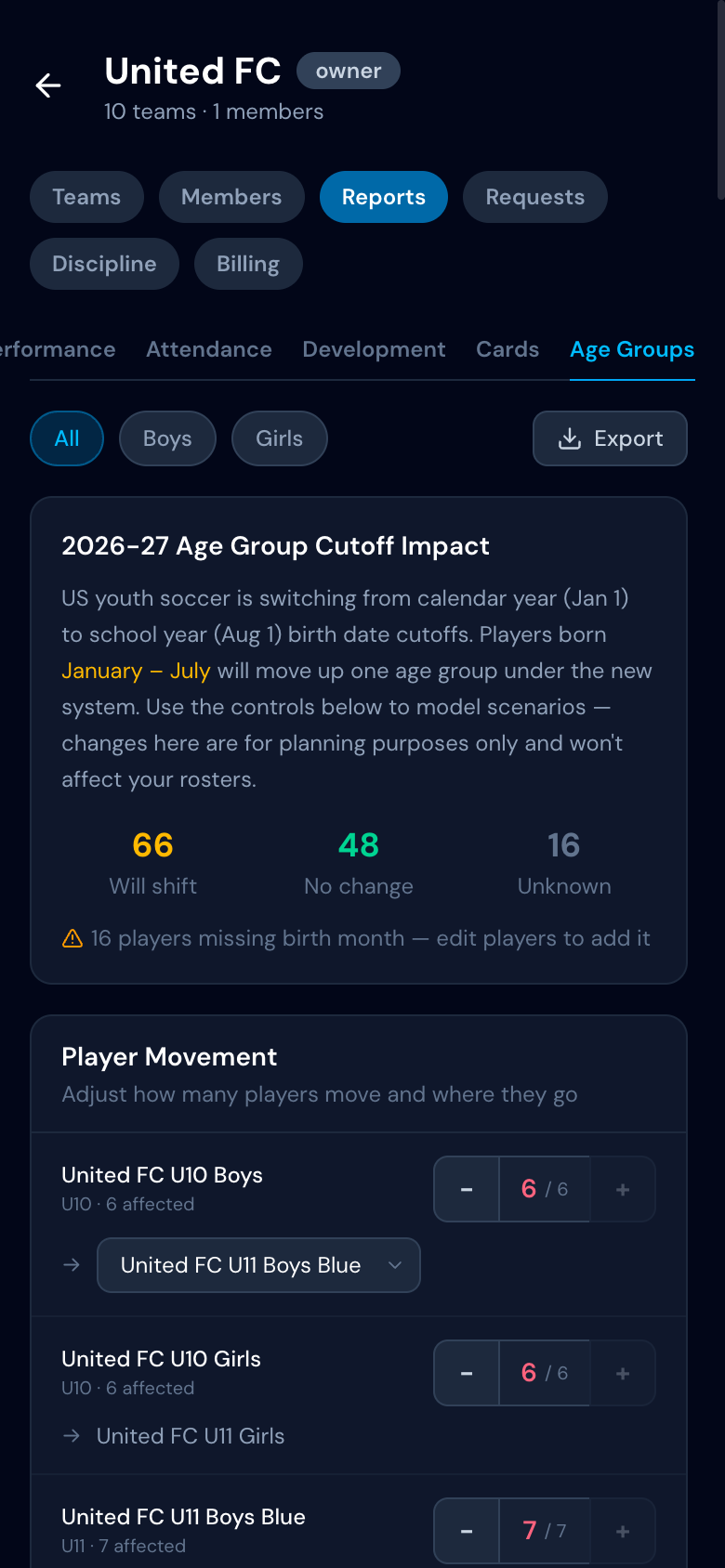
- •Amber — born Jan–Jul, will move up one age group
- •Green — born Aug–Dec, no change
- •Gray — birth month not yet added
Club directors see the full picture across every team — how many players are affected, which teams need the most attention, and where birth months still need to be filled in.
The Age Groups report is free for all clubs — no Club IQ subscription required.
Model Your Roster Changes
Knowing who's affected is step one. The real question is: what will your teams look like after the shift? The Age Groups report includes a roster projection calculator that models the movement across your entire club. what will your teams look like after the shift? The Age Groups report includes a roster projection calculator that models the movement across your entire club.
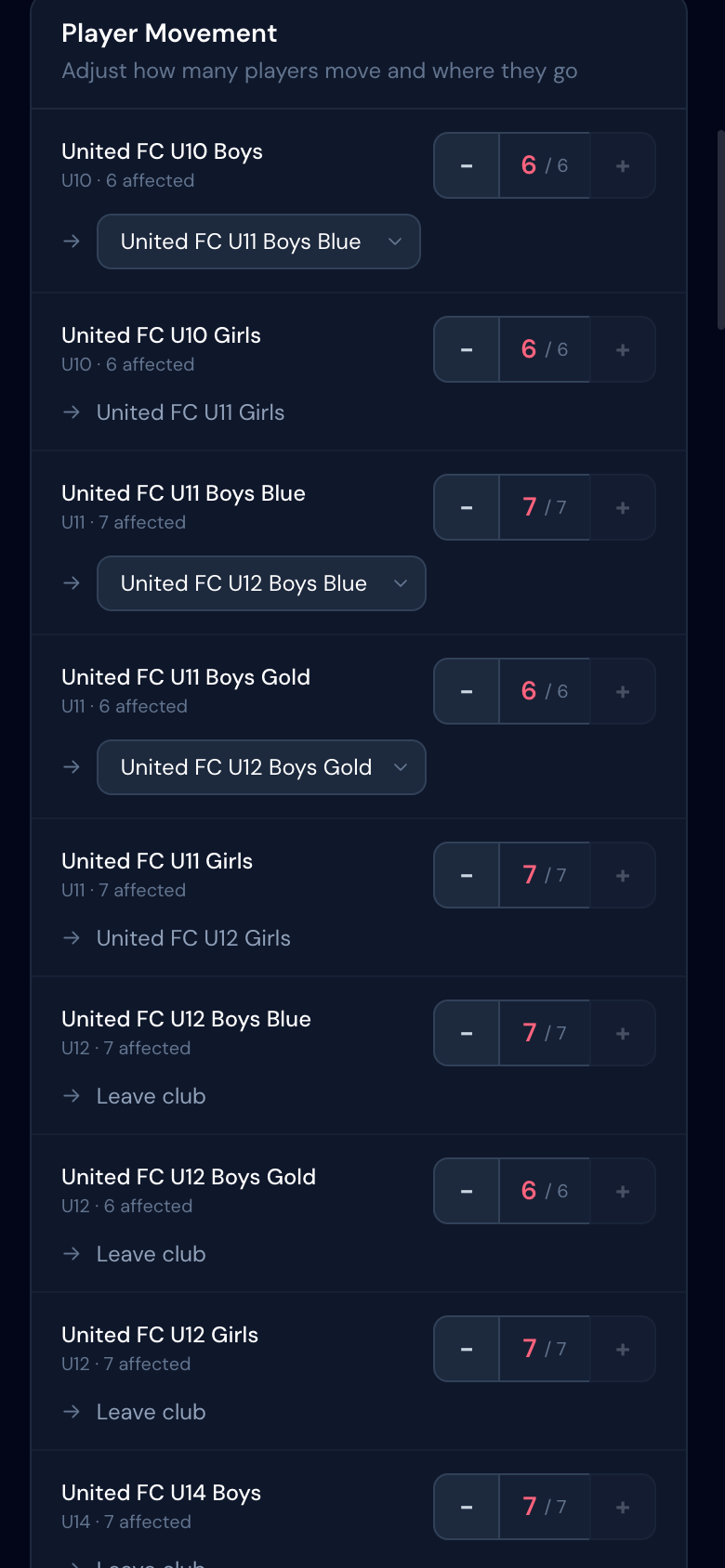
- •Adjust retention — not every affected player will move. Use the stepper controls to model how many actually leave each team.
- •Choose destinations — when there are multiple teams at the next age group (e.g. Blue and Gold tiers), pick where each group of players goes.
- •Gender-aware matching — boys only flow to boys teams, girls to girls. Tier names (Blue, Gold, etc.) are auto-matched.
Projected Roster Sizes
The projection table shows you the numbers at a glance: current roster, players out, players in from the age group below, net change, and projected total. This is how you spot problems before they happen.
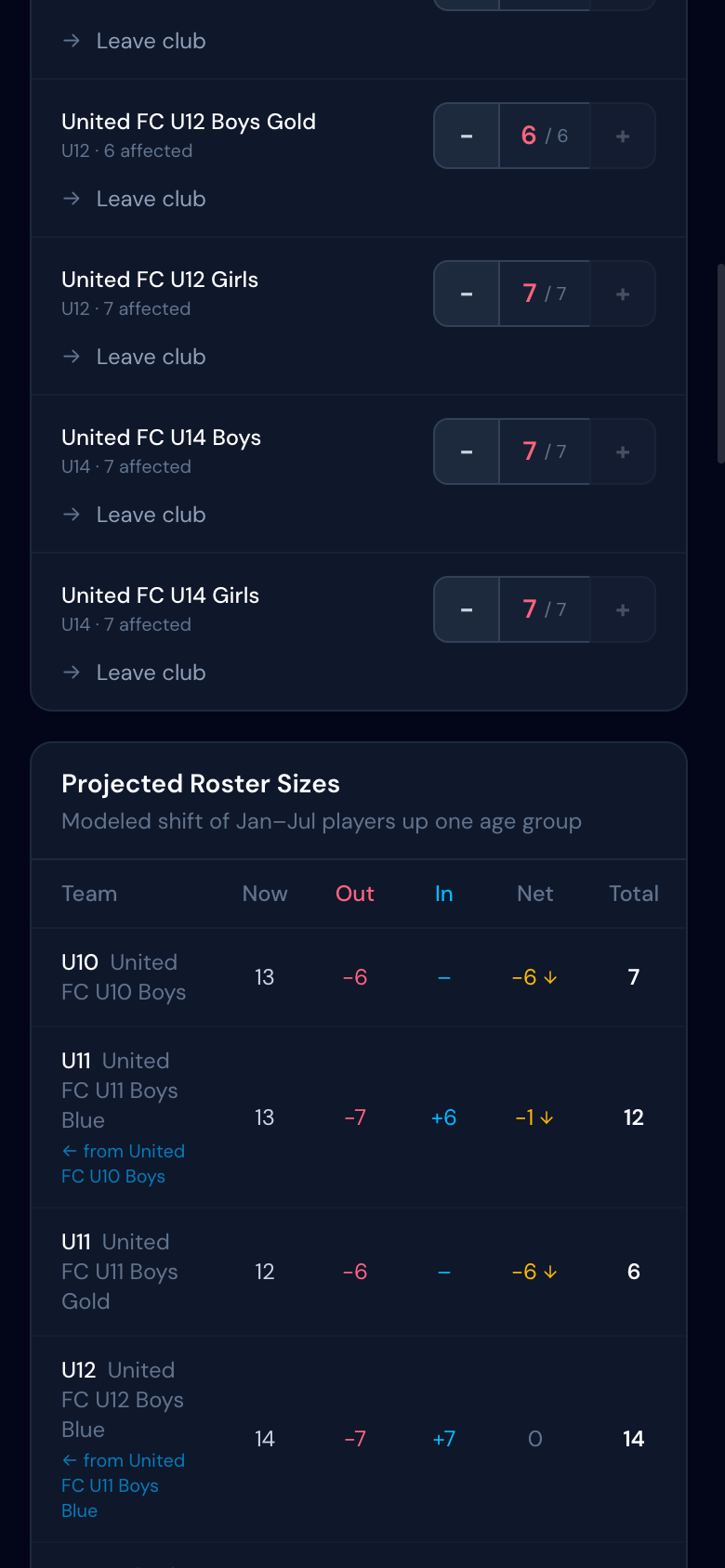
- •Goalkeeper warnings — Goalkeeper warnings — if a team loses all its GKs with no replacement incoming, you'll see a red alert. This is the kind of problem you want to catch in March, not at the first game.
- •Play-up candidates — when a team is projected to be short, the report suggests players from the age group below who have strong report card scores and could play up.
Per-Team Player Details
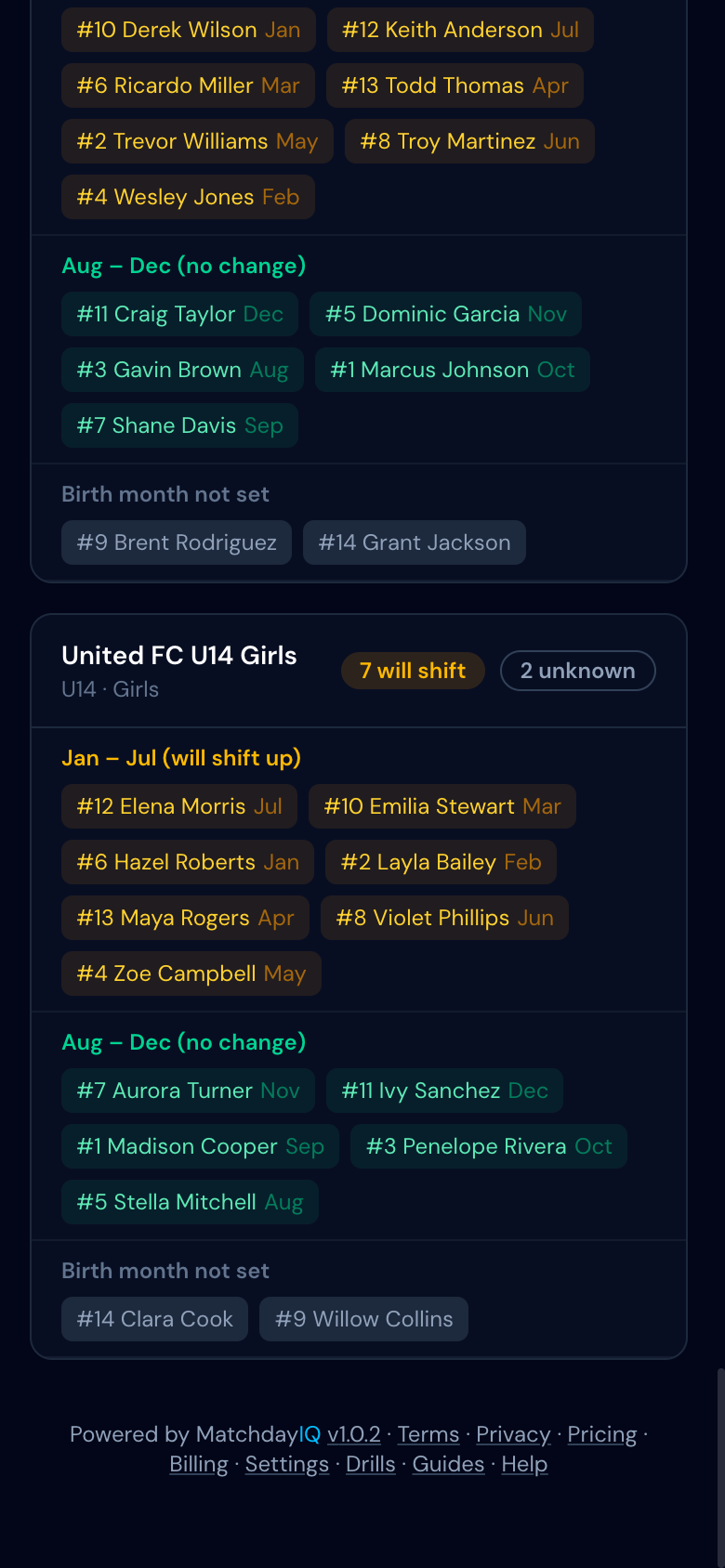
Each team gets a detailed breakdown showing every player, color-coded by status. You can see exactly who's shifting, who's staying, and who still needs their birth month added.
Export to Excel for Team Planning
Need to share with your board or work through assignments in a spreadsheet? The report exports to an interactive Excel file with:
- •Editable team assignments — every player has a dropdown to reassign them to any team, "New Team," or "Leaving Club"
- •Fill in missing birth months — the Status column auto-updates when you enter a birth month
- •Live roster summary — a second sheet with COUNTIF formulas that update automatically as you change assignments
- •Report card ratings — each player's overall score so you can identify play-up candidates
This is especially useful for clubs that need to split one team into two at the next age group, or merge two small rosters into one.
Once you know who's moving, our equal playing time tools help integrate new players into their new teams smoothly, and player report cards track their development through the transition.
Frequently Asked Questions
When does the new youth soccer age group system start?▾
The new school-year-based age groups take effect for the 2026-27 seasonal year. Most leagues will implement the change starting with fall 2026 registration. Some states began transitioning during the 2025-26 season.
What is the new birth date cutoff for youth soccer?▾
The new cutoff date is August 1. Players born on or after August 1 will move to the younger age group. Previously, US Youth Soccer used a January 1 calendar-year cutoff.
Will my child change age groups because of the new cutoffs?▾
It depends on their birthday. Children born between January 1 and July 31 may move up one age group. Children born August 1 through December 31 stay in the same relative group. Use the age group chart in this guide to check your child's specific situation.
Why is US youth soccer changing age group cutoffs?▾
The change aligns soccer seasons with the school year, which is how most other youth sports already operate. It also aligns the US with international standards used by FIFA and most other countries. The goal is to reduce confusion, improve team continuity, and make it easier for families managing multiple activities.
Does the age group change affect all youth soccer organizations?▾
Yes. US Youth Soccer (USYS), US Club Soccer, and AYSO have all adopted the August 1 cutoff. This covers the vast majority of recreational and competitive youth soccer in the United States.
Can my child still play up or play down an age group?▾
Yes. Playing up (competing in an older age group) remains allowed and is handled by individual clubs and leagues. Playing down typically requires a waiver and is less common. The restructuring does not eliminate age flexibility — it just changes where the lines are drawn.
How does the age group change affect college soccer recruiting?▾
College recruiting timelines are tied to high school graduation year, not soccer age group. The restructuring actually makes this cleaner since soccer age groups now align more closely with school grade. Players should continue tracking their graduation year for recruiting purposes.
What should coaches do to prepare for the age group change?▾
Review your roster against the new cutoff dates to identify which players may shift groups. Communicate early with families about potential changes. Plan tryouts and team formation around the new groupings. A roster management tool that tracks positions and playing history makes reorganizing teams much easier.
Is there a tool that shows which players are affected by the new cutoffs?▾
Yes. MatchdayIQ lets coaches record each player's birth month, then the club dashboard shows an Age Groups report that flags every January–July player across all your teams as potentially needing to move up. Club directors can see the full picture at a glance — how many players are affected, which teams are impacted, and which players still need their birth month added.
How do I plan roster sizes after the age group change?▾
MatchdayIQ's Age Groups report includes a projection calculator. It models how many players leave each team, how many arrive from the age group below, and what the final roster size will be. You can adjust how many players actually move (not everyone will) and choose which team they go to when there are multiple options. It also warns you about critical gaps like losing your only goalkeeper.
What if a team is too small after the age group shift?▾
The projection tool flags teams that will be below their game size (7, 9, or 11 players). It also identifies play-up candidates — players from the age group below who have strong report card scores and could handle competing at the next level. The final decision is always the coach's, but the data helps you have an informed conversation.
Can I share the roster projection with my club board?▾
Yes. The Age Groups report exports to an interactive Excel spreadsheet. Board members can reassign players between teams using dropdown menus, fill in missing birth months, and the roster summary updates automatically. It's designed for planning meetings where multiple people need to work through the assignments together.
Plan your rosters for 2026-27 today
MatchdayIQ's Age Groups report shows every affected player across your club, projects roster sizes, flags goalkeeper gaps, identifies play-up candidates, and exports to Excel for board planning. Free for club directors.